Showing posts with label orignal lollipop. Show all posts

Thursday, 31 August 2017

[ROM] MIUI v6 5.7.16 for lava iris x8 (mt6592)


[ROM] MIUI v6 5.7.16 for lava iris x8 (mt6592)
Features
Rooted
FM Radio Working
Bluetooth Working
Mi Themes, fonts, wallpapers
Miui 6 Boot animation
Stable as Rock
Smooth as butter
MIUI ROM 5.7.16 Full Changelog
[System]
Optimization - Adjusted One-handed mode title color (07-13)

[Contacts]
Optimization - When adding new contacts in Global version, IM default icon became Skype (07-08)

[Messaging]
New - All notification messages are collected into one folder (India) (07-15)

[Lockscreen, Status Bar, Notification Bar]
Optimization - Display height of lockscreen notifications (07-08)
Fix - Sometimes, prevent misoperation panel appeared incorrectly (07-06)
Fix - Sometimes prevent misoperation mode did not work (07-06)
Fix - Sometimes, pressing lockscreen notification did not lead to the corresponding app (07-08)
Fix - Lockscreen notifications could not display dynamic icons (07-13)
Fix - Sometimes notification shade could not be pulled down (07-13)

[Gallery]
New - Allow downloading cloud album photos using mobile data (07-13)
Fix - Slowness in finding projection devices (07-13)
Fix - Incorrect album covers (07-15)

[Music]
New - Support amr type music files (07-13)
New - Mi Sound Enhancer supports Mi Headphones and Mi Piston Youth Edition (07-13)
Optimization - Reduced Music app launching time (07-13)
Optimization - Reduced occurring times of 'Not enough memory' error (07-13)
Fix - High quality audios could not be downloaded (07-13)

[Settings]
New - Added animation introduction for one-handed mode settings (07-06)

[Calendar]
Optimization - Optimized smoothness of swiping left/right in Monthly view (07-07)
Fix - Calendar might FC when several reminders rang at the same time (07-07)

[Data Usage]
New - Added the feature to recommend to optimize apps so that a large amount of data can be saved (07-03)
New - Data saver supports setting image compression ratio (07-03)
Optimization - Optimized RAM usage (07-03)
Optimization - Optimized daily data usage limit strategy for the last day of a month (07-03)
Optimization - Allow setting data usage limit for lockscreen notifications, and a threshold will be recommended according to the data plan (07-10)

[Blocklist]
New - Support blocking numbers according to the times it has been reported (07-13)

[Notes]
Fix - Inserted images width displayed incorrectly in Mi Note Pro (07-10)

[Clock / Calculator]
Optimization - Ascending volume interval was changed from 5 seconds to 2 seconds (07-08)
Optimization - Alarm clock max auto-silence time was changed to 10 minutes (07-08)
Fix - Sometimes alarm clock could not be turned off (07-08)
Fix - Stopwatch might keep the screen awake (07-15)

[Cleaner]
New - Support deleting duplicate photos from Gallery (07-14)


Download Links: ROM
Google drive link
Thanks to Shyam for uploading it... ROM

must flash patch !!!!!!! if u dont then U MAY CORRUPT THE SYSTEM FLASH THIS AFTER FLASHING THE ROM !!!!!! !!!! 

 PATCH 1 LINK

PATCH 2 LINK

for rooting use kingroot or flash this : link

for internal storage and other problems use xposed and install xiinternalsd links here 
xposed : link
xinternal sd : link

**use this tools to download if u cant download it : link
tips u can flash dolby and music mod for kitkat for best xperience

Monday, 28 August 2017

Resurrection Remix ROM for lava iris x8


About Resurrection Remix ROM
Installation
Downloads 
About Resurrection Remix ROM 


Resurrection Remix the ROM has been based on CM,slim.omni and original Remix ROM builds, this creates an awesome combination of performance, customization, power and the most new features, brought directly to your Device
Many things that in previous versions were tweaked with mods, are now included by default in the ROM so, please enjoy!
Special thanks to, the CM team,OMNI team ,SLIMROMS and of course to all the supporters
Included Main Features


-Navigation Bar
-Enable/Disable Navbar
-Navbar Ring Switch
-Navbar Ring Targets
-Navbar Button Customization
-Navbar Dimensions(Potrait & Landscape)

-Statusbar
-Brightness Slider
-Enable/Disable Show Notification Count
-SuperUser Indicator Switch
-Carrier Label
-Carrier Label Switch
-Carrier label Colour
-Quick PullDown Switch
-Smart Pulldown Switch
-Clock Customizations
-Time & date
-Clock Colour
-Day & date Toogle
-Center Clock/Right Clock Choice
-Battery
-Battery Bar customization
-Battery Icon Customization(circle/landscape/Potrait and more)
-Battery % Text
-Network Traffic Indicator

-Theme Chooser
-RR exclusive PITCH BLACK THEME
-Animations
-Toast Animations
-ListView Animations
-System Animations

-Gestures
-Gestures Anywhere Feature

-App Circle Bar
-Choose apps in App circle
-Trigger Width
-Trigger Hieght
-Trigger Position

-Recents Panel
-Clear All button Switch
-Clear All Tasks Switch
-Clear All Button Location(Top right,Top Left,Top Center,Bottom Left,Bottom Right,Bottom Center)

-Cclock Widget
-CLock And Alarm Customizations
-Weather Panel Customizations
-Calender Events

-LockScreen
-Lockscreen Shortcuts
-Choose upto 5 Shortcuts
-100+ Icons for Shortcuts

-Quick Slider Shortcuts

-Notification Drawer
-Weather Display Switch
-Quick Settings
-Choice to Add 20+ Tiles
-Enable 2/3/4 Tiles per Row
-Enable Disable Birghtness Slider in Notification Panel
-Advanced Location Settings Switch(Choose Battery saving/Device Only/High Accuracy Directly in Notification Panel)
-LongPress Toogles to Enter Settings

-Buttons
-Backlight Timer
-Backlight Strength
-Navigation Bar left/Right handed mode Switch
-Power Menu
-Power Menu End Calls Switch

-Home Button(For devices with HW keys Only)
-Home Button Wake Up
-Home Button answer call
-Long Press Actions
-Double Tap Actions

-Back Button(For devices with HW keys Only)
-Wake Up device Switch

-Menu Button(For devices with HW keys Only)
-Wake Up Device Switch
-Short Press Actions
-Long Press Actions

-Search Button(For devices with HW keys Only)
-Wake Up Device
-Short Press Action
-Long Press Action

-Volume Buttons
-Wake Up Device
-Playback Control
-Keyboard Cursor Control
-Swap Buttons on Landscape mode

-Perfomance Profiles
-LCD Density
-Expanded Desktop Mode
-All New CM Audio FX App
-Heads Up Customizations
-OverAll Smoothness Improvements
-Quick Unlock
-Optimizations to Improve Battery
-ALL cm12 Features
-AND MUCH MUCH MORE
NO ONE READ THE THINGS ABOVE ?
I KNOW BUT IF U DONT READ THIS U LL NOT ABLE TO ENJOY THE ROM!!!!!!!!
TESTED BY ME WORKING CLEAN AND BUGFREE USING  philz RECOVERY I M UPLOADING THE RECOVERY TOO IF NO 1 WANTS TO TAKE ANY RISKS
READ THIS CAREFULLY!!!!!!!!!!!!!!!!!!!!!!


[b][i] Installation Insturaction [indent]
- (Remenber only philz and twrp 2.8.6 can flash this rom )
I recommend to flash it over a freshly install pac or cm11 without wiping data ( not necessary u may proceed without pac or cm11)
1) put d rom in external sd card
2) rboot to recovery > wipe cache davilk cache and data(not recommended for cm11 or pac user)
install zip > navigate to sd card > select zip
3) flash d rom
now the real part begins
after booting d rom u will get blutooth fc ignore this
4) now open app drawer (launcher) > open the app named "selinuxchanger"
5) allow root permission
6) then select "permissive"
without wasting time navigate to setting > developer setting > turn on advanded reboot
7) hold power button
8) click on reboot
9) select soft reboot
voila camera and sensor starts working

Cam not there in launcher
dont worry install any third party app or use camera from lock screen

wifi not turning off
go to setting > wifi > press action key > select advanced > disable scanning always availale

sound very low?
just enable all 3 buttons down in Dolby atom and use any 3rd party music app


Screenshots


PATCHES :-
1st : link
2nd :   link

SUPER SU FLASHABLE LINK (USE THIS IF U LOVE SUPERSU OR USE INBUILT ROOT LIKE IN CM 12.1) : LINK


philz RECOVERY : LINK


HOW TO FLASH A RECOVERY ?
READ THE XDA THREAD CAREFULLY OR JUST LEAVE IT BUT DONT ASK THESE THINGS AGAIN!!!!!!!


FAQ...
Q:Camera and Sensors are not working.
A:Just soft reboot

Q:I can't see installed Apps In My app drawer.
A:Just FC the launcher..
or try using Other Launchers.. 

Q:Sound is low..
A:Just flash Dolby Atmos from here.And enable all three buttons.
If still facing Low sound...go to audio fx and turn it off

Q.Can't Connect to Computer
A. Just go to storage/USB connection/and tick on mtp...
That's it


JUST READ EVERY THING CAREFULLY!!!!!!!! 
HIT LIKE ON XDA TOO IF U LOVED MY WORK OR WANT MORE ROMS :)

Wednesday, 23 August 2017

[ROM]HYBRID LG G3 -- BASED ON DARK Lfor mt6592 octacore devices

[ROM]HYBRID LG G3 -- BASED ON DARK L for mt6592 octacore devices


Great news to SKK LYNX the porting team ARGN has released a new ROM LG G3 themed AOSP ROM with amazing features

** Bugless ROM*
* LG G3 themed UI*
* Google keyboard*
* More Ram Space*
* Good Battery saver *
* Stable and Smooth*
* Increased Camera Quality*
* Dolby Effects added*
="border-style: initial; border-width: 0px; box-sizing: border-box; margin: 0px; padding: 0px;" width="738px">
* Bloat Wares Removed*
* Fully Deodexed *
* LG G3 ringtones *
* Dark L Features 4G speed H+
* And Much More.......


HOW TO INSTALL?
(Phils/TWRP/CWM)
Go to recovery...
Clean to install new rom
install zip
after installing the zip wipe cache and dalvik/art cache then REBOOT!
and choose no.

--CREDITS--
UNITED OF LYNX PORTING TEAM
TEAM ARGN
DARK L TEAM

Friday, 18 August 2017

HOW TO FLASH A ROM USING CTR RECOVERY

HOW TO FLASH A ROM USING CTR RECOVERY

If you fear of bricking your device then make a backup by going into 'Backup and Restore' option and click on Backup. It will backup your whole system files with data except SD Card data.
How to Flash Custom Roms on Gionee M2 using CTR Recovery | With Screenshots

Click on Wipe Menu and then click the first one Wipe Preflash to format system, data and cache files. After they are done, swipe left to go back.How to Flash Custom Roms on Gionee M2 using CTR Recovery | With Screenshots


Now, tap the custom rom zip which you want to install.

How to Flash Custom Roms on Gionee M2 using CTR Recovery | With Screenshots
The rom will start to install.

How to Flash Custom Roms on Gionee M2 using CTR Recovery | With Screenshots

 After installation, you will see this.
How to Flash Custom Roms on Gionee M2 using CTR Recovery | With Screenshots
Now, swipe left to go back to main screen and click 'Reboot the phone'

How to Flash Custom Roms on Gionee M2 using CTR Recovery | With Screenshots

After reboot, you will see Boot Animation of the Custom rom you just flashed.

How to Flash Custom Roms on Gionee M2 using CTR Recovery | With Screenshots
voila u flashed a custom rom

QuickBoot for CyanogenMod 12.0 / 12.1 (iris x8)


QuickBoot for CyanogenMod 12.0 / 12.1

/* Installation */

1. Download QuickBoot.zip from XDA attachments section
2. Flash the downloaded zip file from the recovery
3. Enable QuickBoot from Developers options

download link for lava iris x8 here

how it works and what is it exactly
see here

Wednesday, 16 August 2017

miui 7 for mt6592 for porters

For porters only miui 7 for mt6592


MIUI 7 Pink Theme
The new ROM packs four new themes focused on gender e.g. Pink “Goddess” theme for Xiaomi’s female users, you can even obtain images of specific people in your gallery through a face recognition tech inside. If you are a pet lover then you will be pleased to know that Xiaomi has even added a pet section which contains all the pet snaps that you have taken.
MIUI 7 Gallery face recognition
MIUI 7 features 1

Here is the key features of MIUI 7:

  • The brand new MUSE feature will allow users to create themes without any programming language.
  • Total four different category framework UIs comes pre-loaded including women, girls, boys and luxury version. Extravagance form, every offering upgraded desktop symbols, individual design elements and more personalized features.
  • Standard MIUI 7 has five sets framework UI that can be changed during the boot time.
  • Quicker user interface response time and transition animations by around 30% contrasted with MIUI 6.
  • Streamlined CPU planning system, strict background power administration to let an application to wake up just when it’s required and breaking point superfluous utilization of WiFi, information system or area administrations out of sight to enhance battery life by 7 to 25% contrasted with MIUI 6
  • New huge textual styles. For example : standard, medium, large and Extra large.
  • Face Unlock innovation naturally recognizes and sorts out photographs of infants and pets as an accumulation that can be shared effortlessly
  • Kids mode shrouds all your own data and desktop formats, with the goal that kids can get to applications just you offer access to.
  • My business card gives you a chance to include your picture that will appear on your friend’s screen when you call or even a five second video feature
  • Mi Roaming is another virtual SIM service that works in 36 locales nations and areas, including China, Hong Kong, China Taiwan, the United States, Japan, UK and Australia. You can appreciate International meandering in these districts and purchase information at a normal cost of only 0.1 yuan for each MB or beginning at 15 yuan for every GB (US$2.3 approx.).

Download LINK 

making any rom lag free

How to make your low end devices lag free and lightning fast.

HERE IS A SIMPLE BUT THE MOST EFFECTIVE WAY TO DO SO:

INSTRUCTIONS

Download this simple app from the link here (xda version) or here
if u liked the app plz buy it from here

(thanks t its developer)
and modify as shown below 

  Seeder Kills Lag in Android, Seriously Boosts Your Phone's Performance

Tuesday, 15 August 2017

XPOSED FOR LOLLIPOP (CM 12.1 AND BASED ROMS)

XPOSED FOR LOLLIPOP (CM 12.1 AND BASED ROMS)


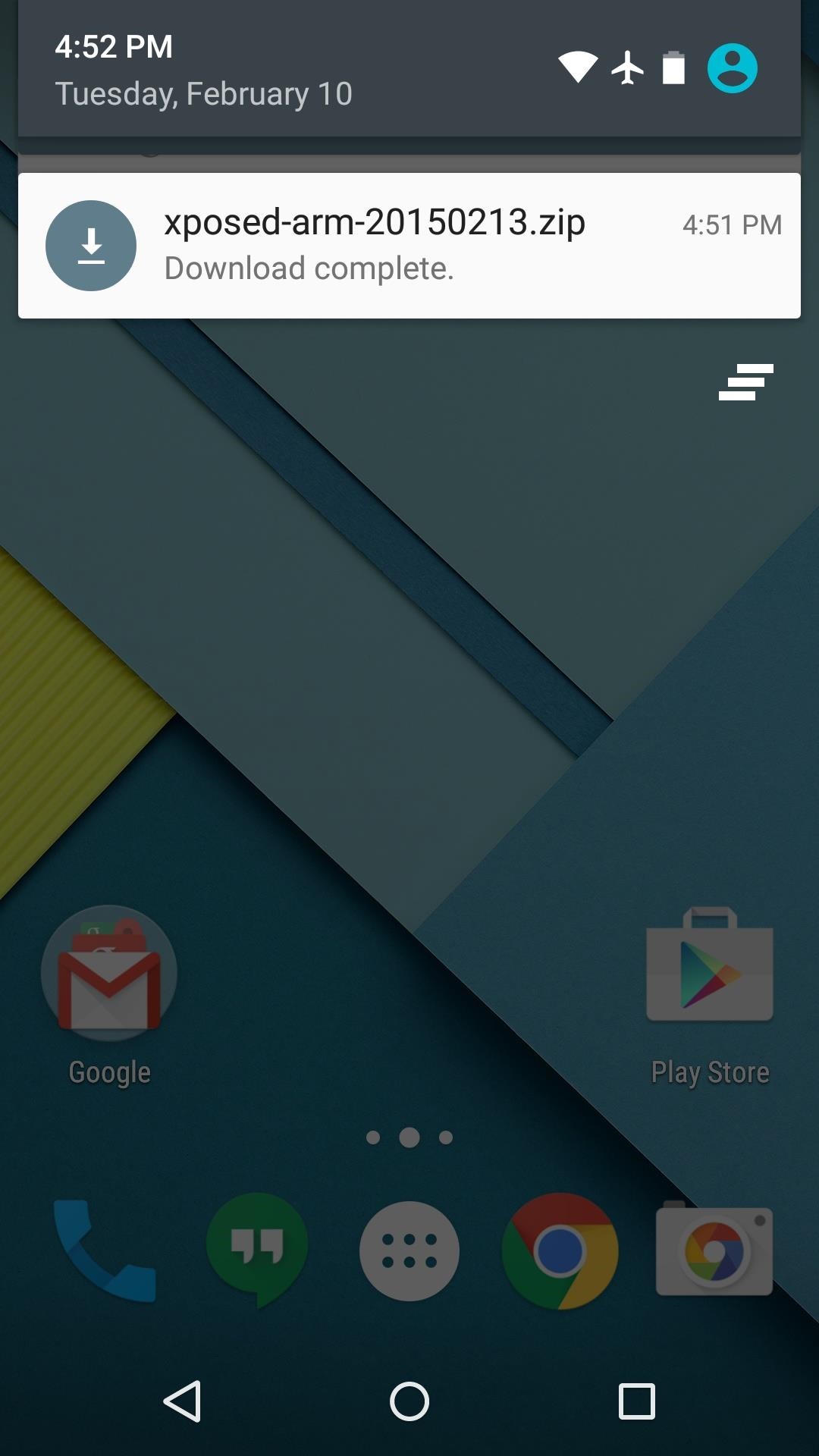
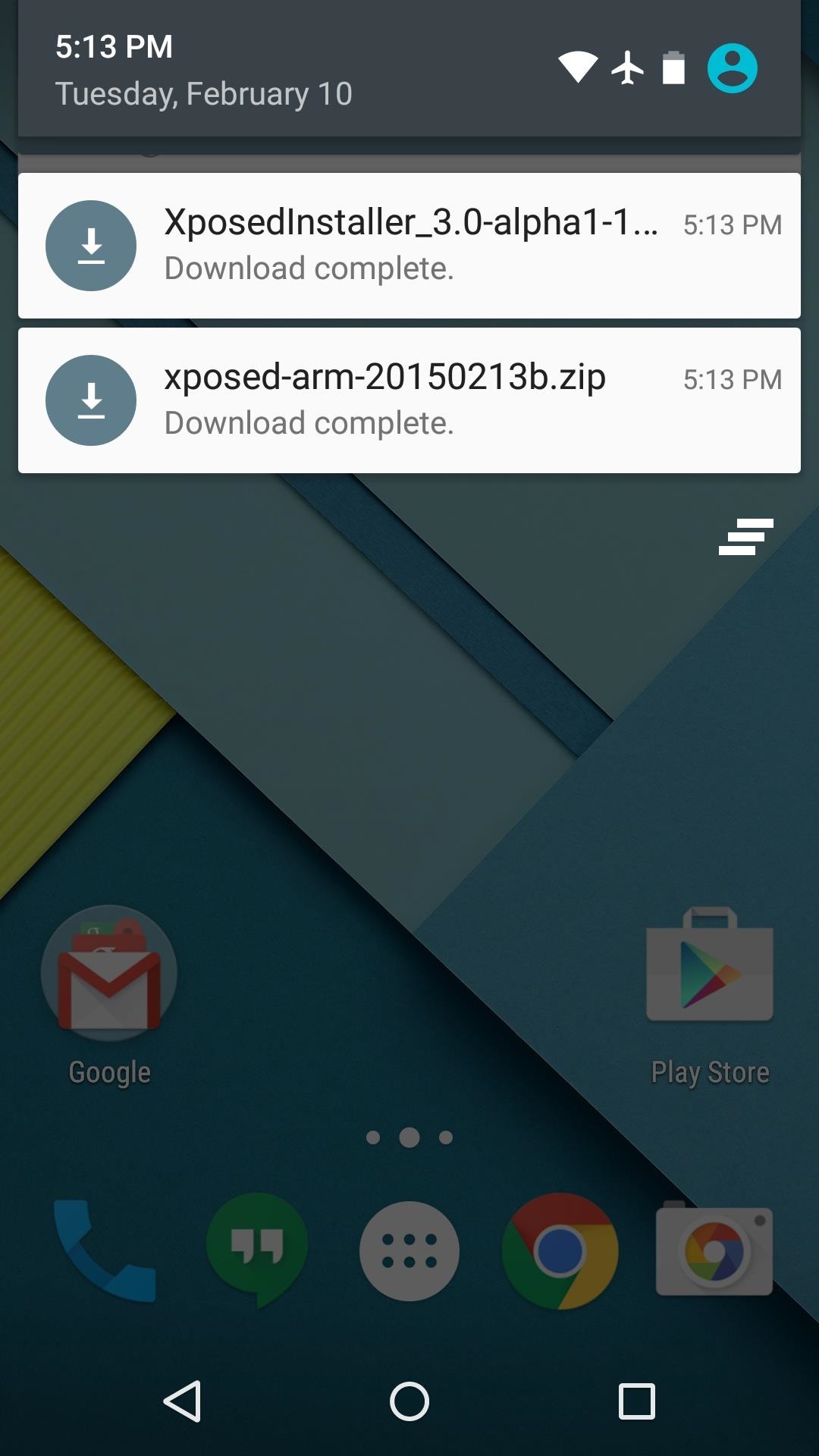
Step 1: Download Necessary Files

There are two core elements to Xposed—one is the Xposed Framework, which lays all of the groundwork, and the other is the Xposed Installer app, which allows you to download and manage modules. First up, grab a copy of the Installer from the following link:
In these early stages of Lollipop development, the Framework will have to be flashed in custom recovery. There are 3 different version of the Framework, and they each correspond to a different type of processor (ARM, ARM 64, x86). If you're not sure about the type of processor your Android device uses, check the spec sheet on a site like GSMArena, then download the corresponding ZIP file from one of these three links:

Step 2: Boot into Custom Recovery

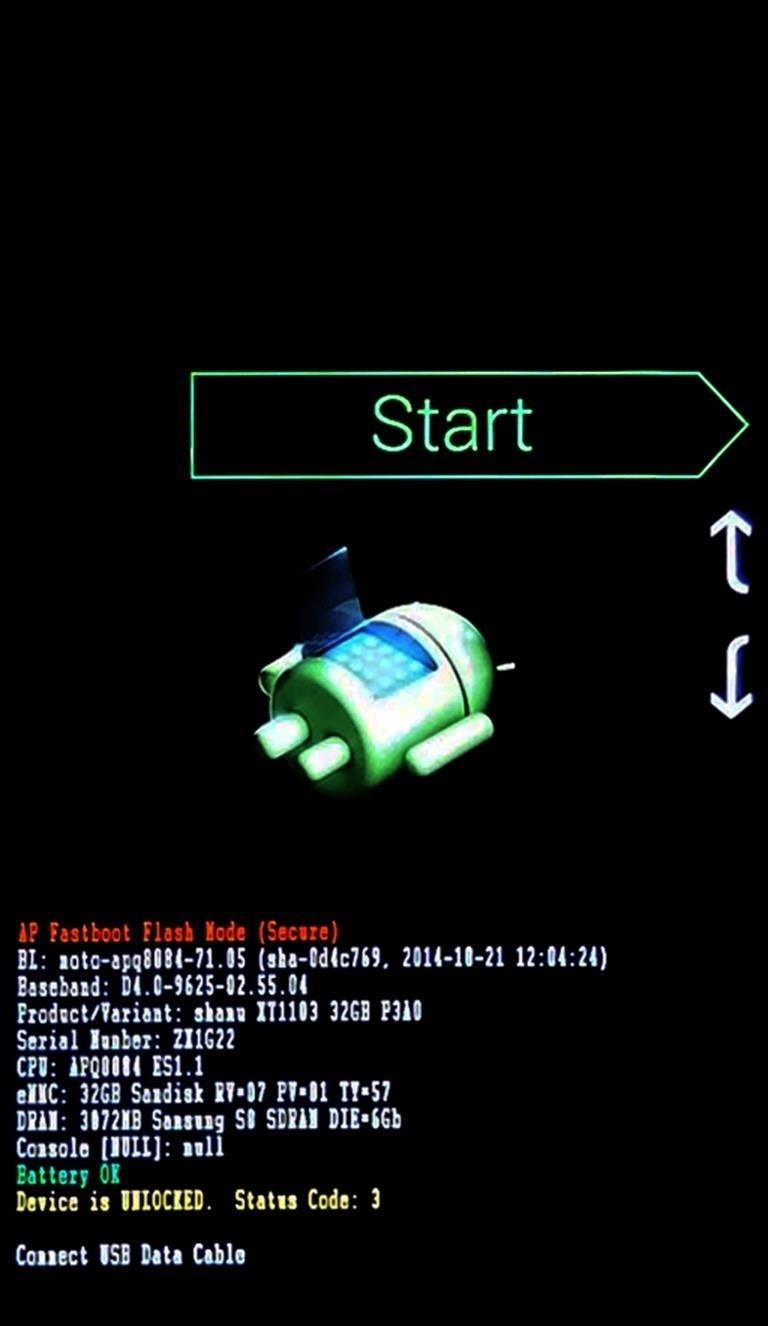
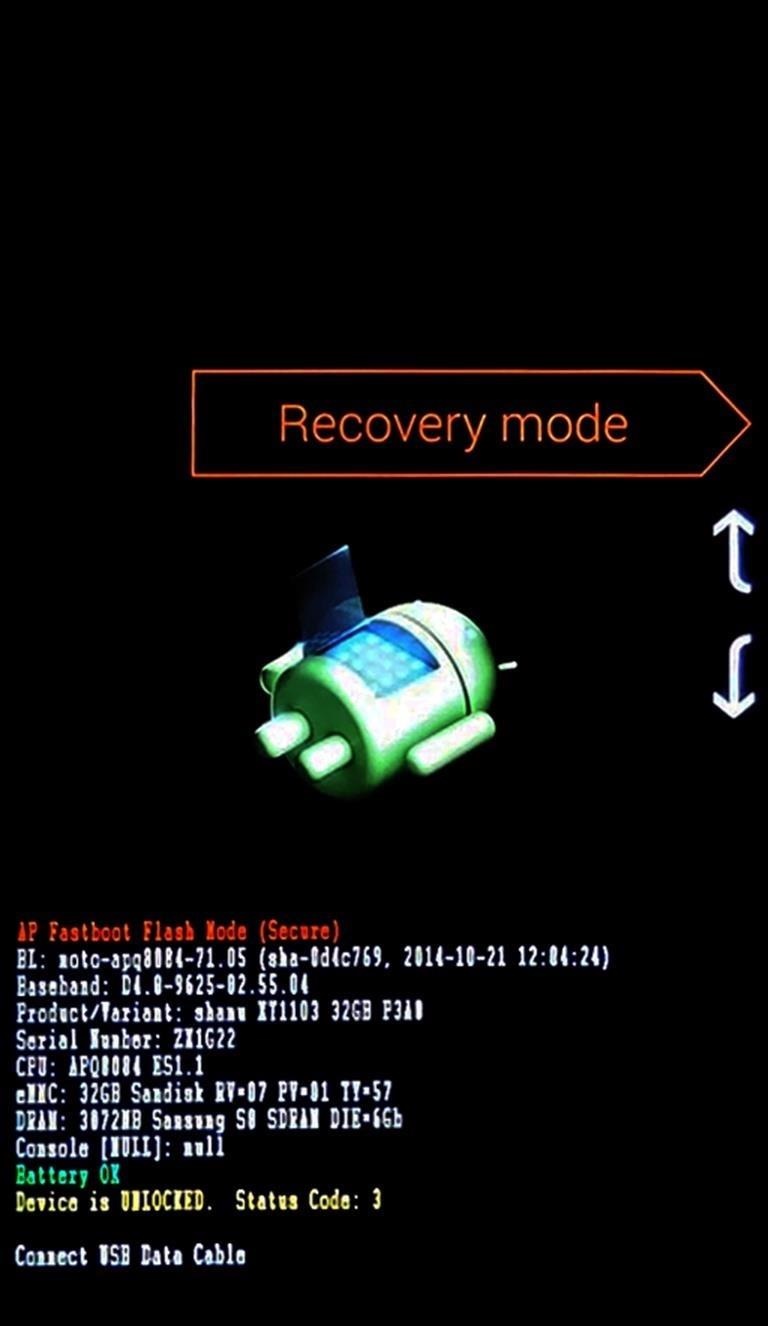
When the files have finished downloading, the next step is to boot into custom recovery. To do that, start by powering your device completely off. This next part may vary, but for most devices, press and hold the volume down and power buttons simultaneously.
This will bring up Android's Bootloader menu. From here, use the volume down button to highlight "Recovery mode," then press the power button to select it.

Step 3: Install the Framework in Custom Recovery

Before you flash anything in custom recovery, it's always a good idea to make a full NANDroid backup. That's extra important in this case, since the Xposed Framework is in its early stages and may cause issues with some devices. Do not skip this step!
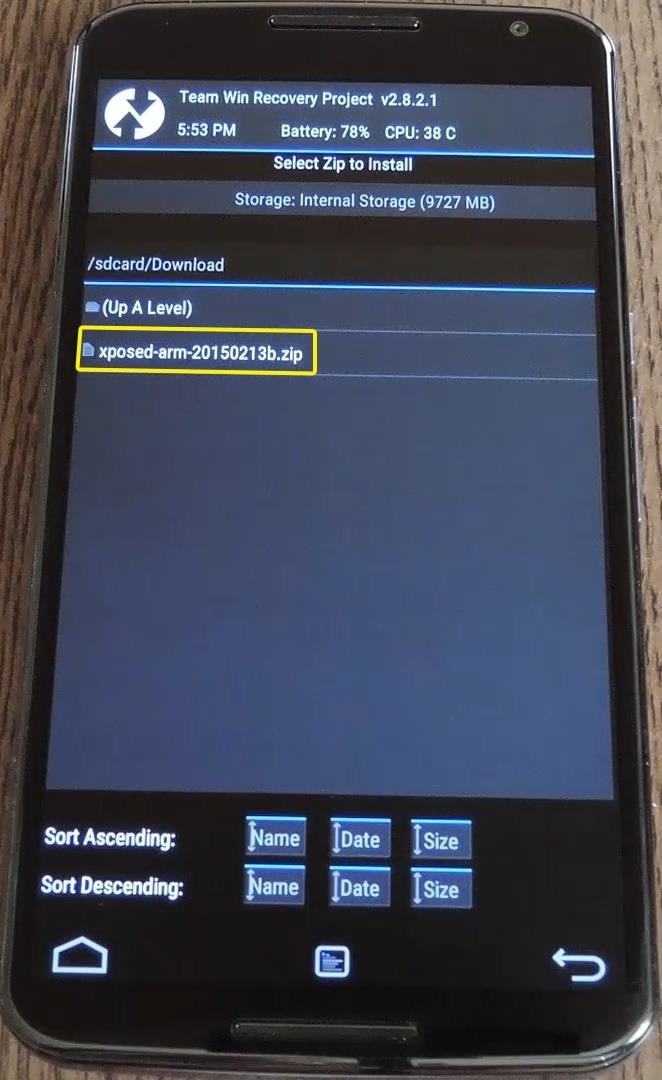
Then, to get started, go ahead and tap the "Install" button from TWRP's main menu. Next, navigate to your device's Download folder, then select the Xposed ZIP file that you downloaded in Step 1.
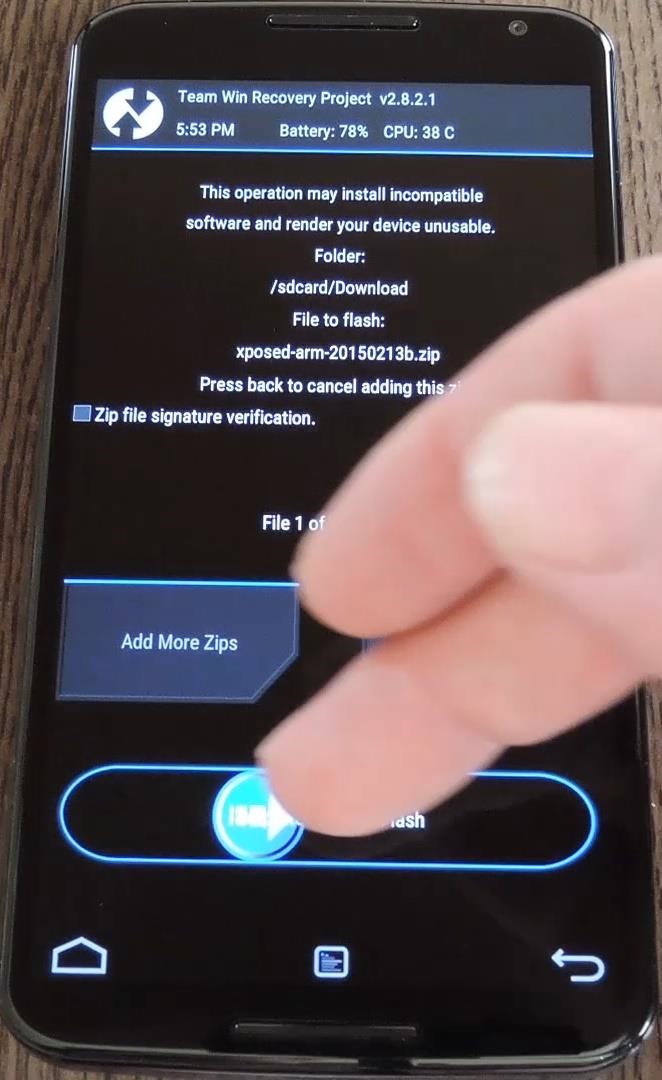
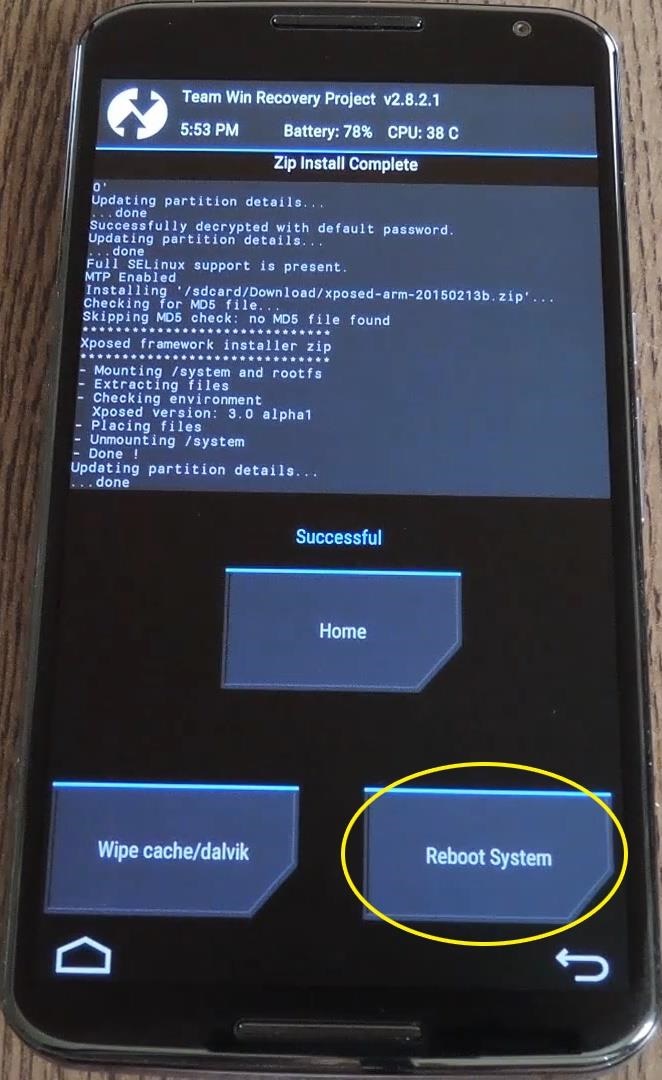
After that, just swipe the slider at the bottom of the screen to install the Framework, and when that's finished, tap "Reboot System."
Your device will take longer than normal to boot up here. This is because the Xposed Framework ZIP had to clear away some library files, which will need to be restored. Expect this process to take at least 10 minutes.

Step 4: Install the Xposed Installer App

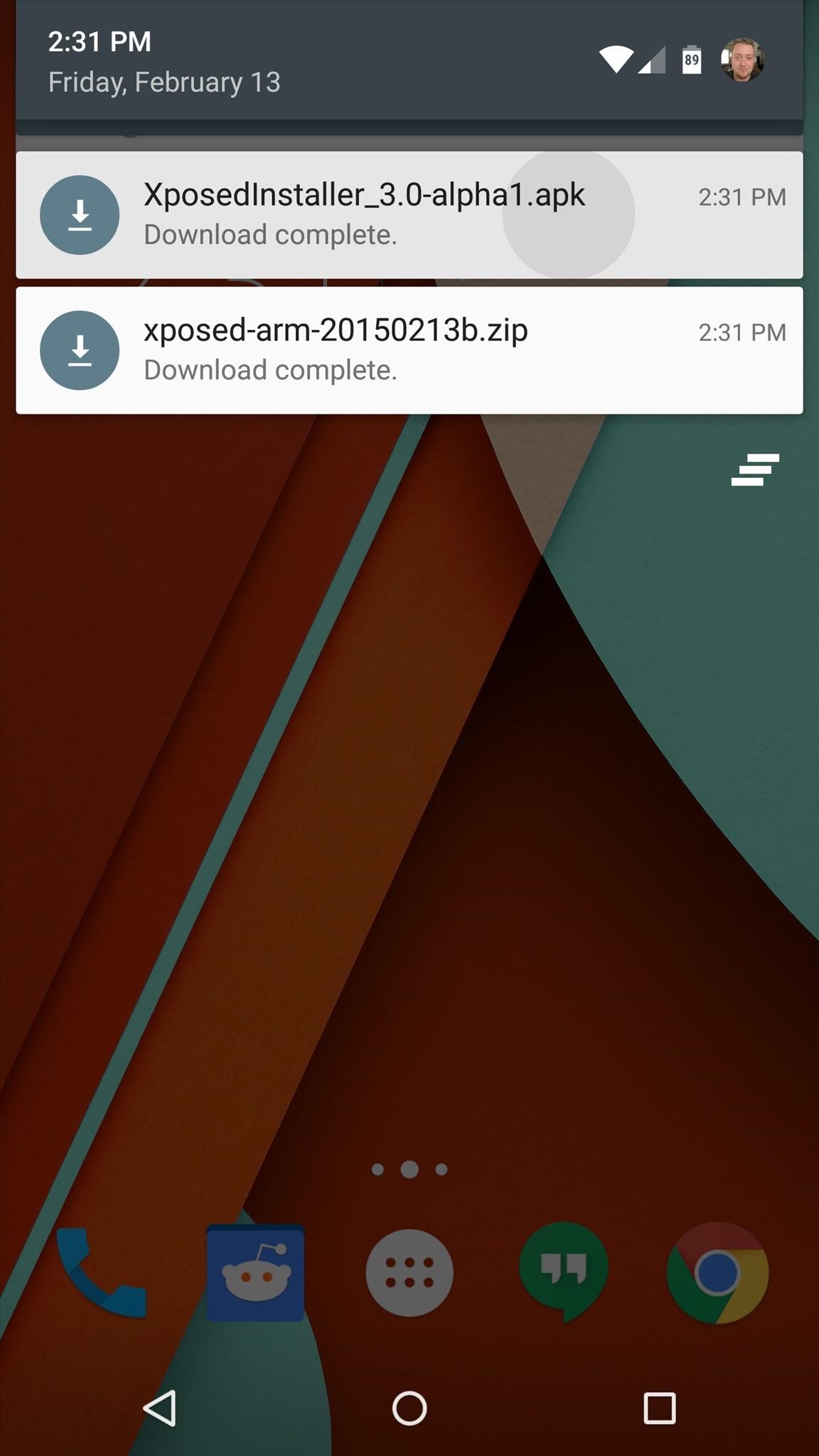
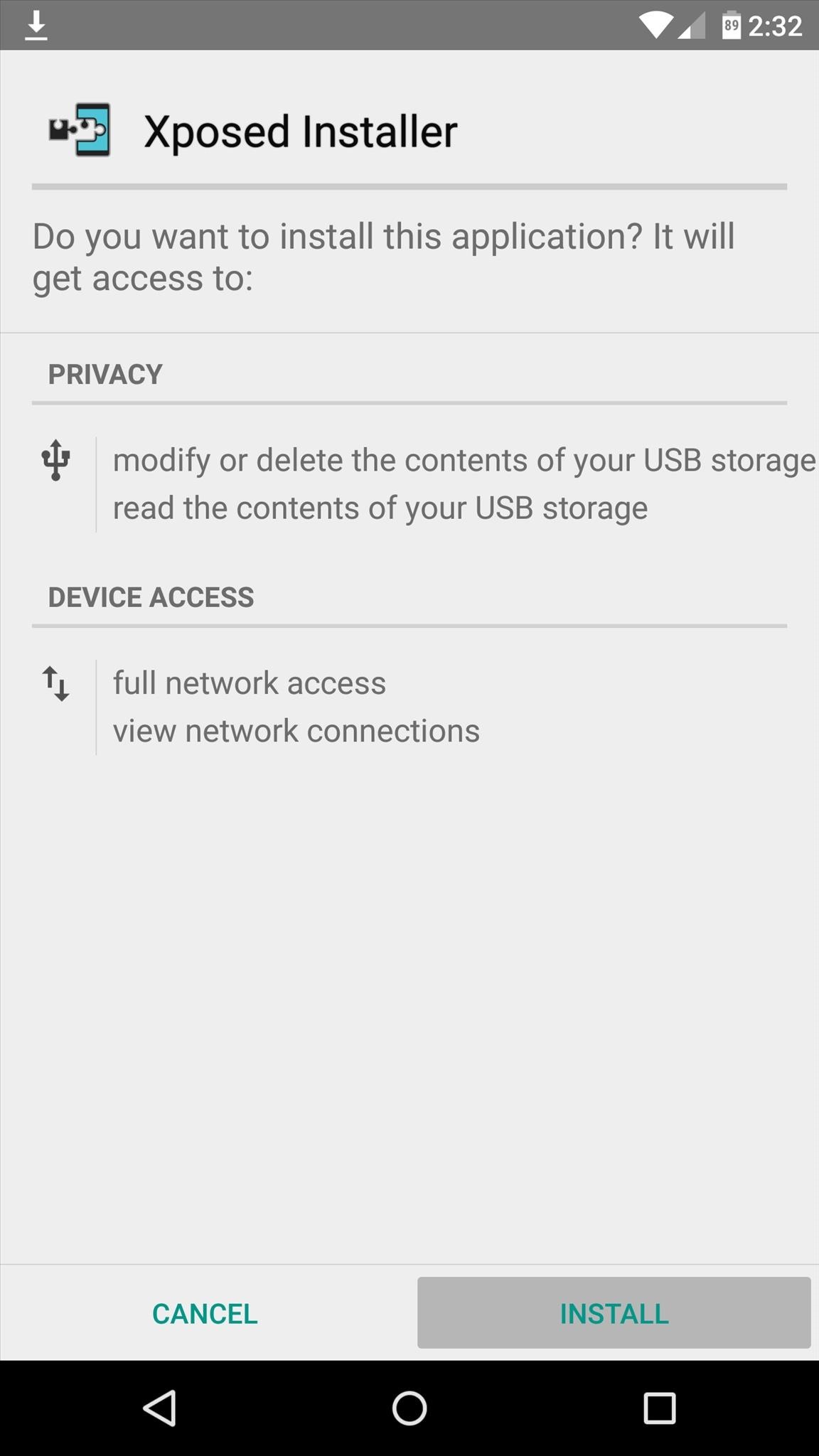
When you get back up, it's time to install the actual Xposed Installer app. Tap the Download Complete notification for the "XposedInstaller_3.0-alpha3.apk" file, then press "Install" and "Open" on the next two menus.
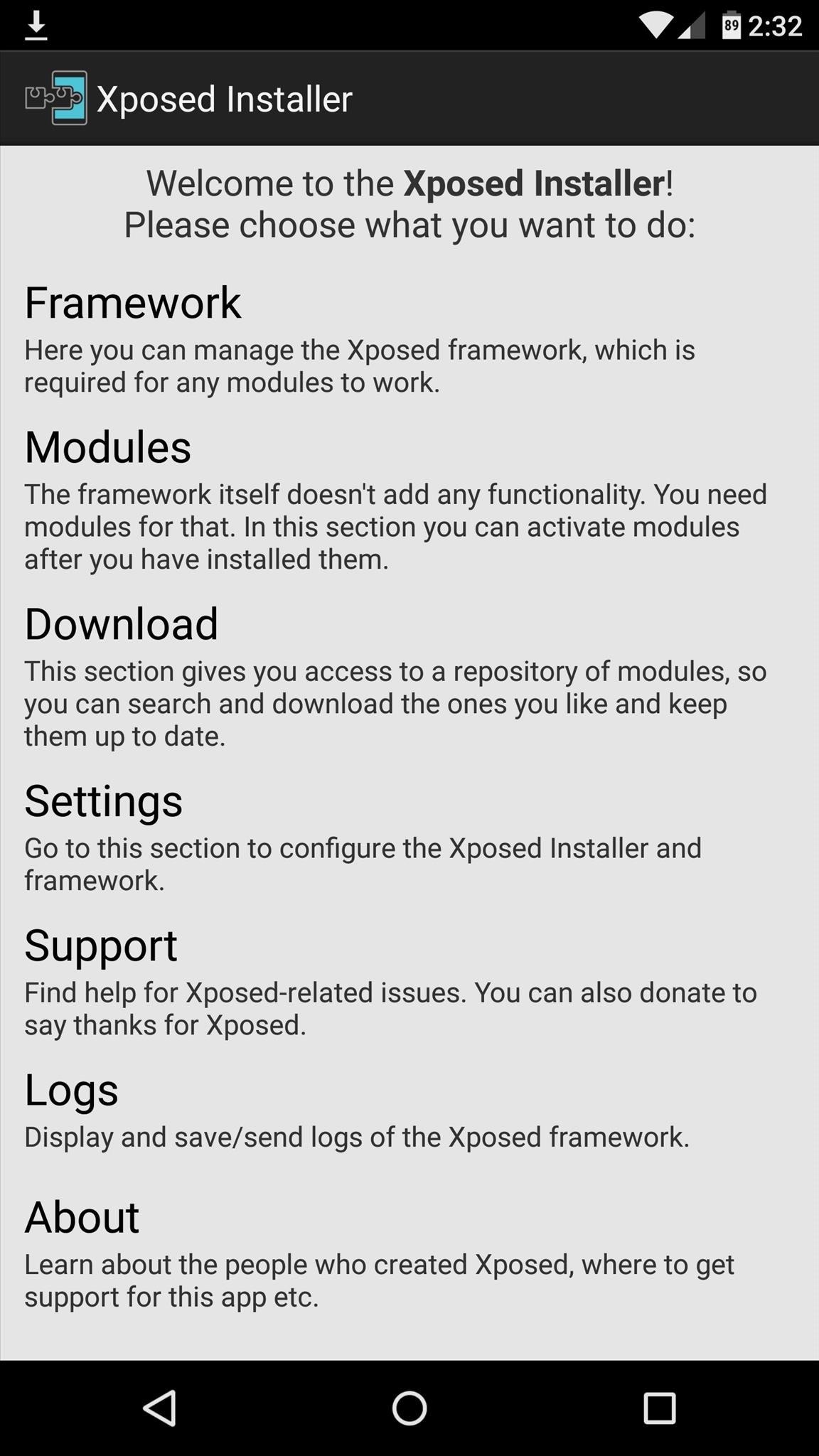
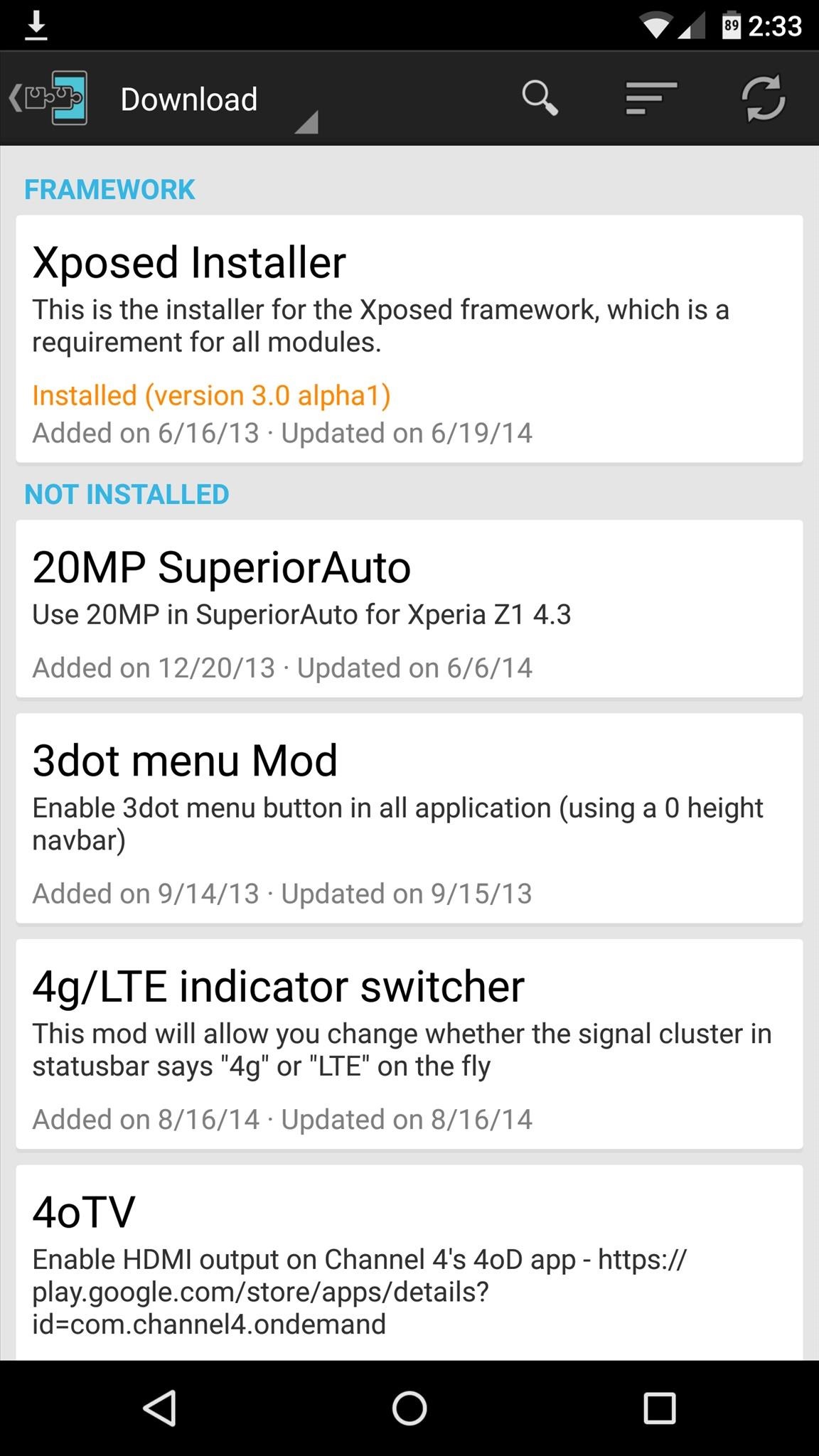
At this point, you should be looking at that familiar Xposed interface we all know and love. Head to the "Download" section to begin browsing modules, but keep in mind that some may not work on Lollipop.

Sunday, 13 August 2017

BlissPop Rom For MT6592 OCTACORE

Here is Another Cm Based BlissPop Rom For MT6592 OCTACORE


PLEASE READ CAREFULLY FULL POST


Disclaimer

Team Bliss is not responsible in any way for anything that happens to your device in the process of flashing.
Please familiarize yourself with flashing and custom rom use before attempting to flash the rom.
Please make sure you download the correct version of BlissPop for your specific device. The links are labeled clearly.

Team Bliss is pleased to present to you BlissPop Rom!

BlissPop is one of the most highly customizable roms that you can install on your mobile device,
and we hope you have a truly blissful experience.
A huge thanks to CyanogenMod for the source and all the work and dedication their team puts in to keep us updated.
BlissPop is CM12.1 based, with some features added in from various roms,
and we will continue to update features as they become available.
We will keep up to date with the latest CM code, and updates will be posted on a regular basis.
However, please do not ask for ETA's. We will update the links as soon as they become available.

We will not tolerate any rudeness or anyone being disrespectful in this thread.
We will do our best to answer your questions or concerns as soon as possible.

Visit our website for features that include:
Member sign-up, staff information, all the latest rom downloads,
the option to open support tickets for issues & more!


Working

Fix Dual Sim
Fix Camera
Fix Video Recording
Sensor
Flashlight
Sensors
Sound
Bluetooth
IMEI detection
And Many More


Not Working

Gps & hotspot
Sim2 data


Features

Personalization Options

CM12 Theme Engine

Status Bar
-Clock & Date Options
-Battery Options
-Battery Bar Options
-SuperUser Indicator
-Bluetooth Indicator
-Brightness Control
-Mobile & Wifi Icon Options
-Notification & System Icon Options
-Network Traffic Monitor
-Breathing Notifications
-Bliss Logo Option
-Notification Count
-Wifi SSID in status bar (see Wi-Fi advanced options!)

Navigation & Button Options
-Set Navigation Ring Targets
-Backlight Brightness & Timeout
-Overflow Button Settings
-Navigation Bar Toggle
-Set Navigation Buttons, Layout & Dimension
-Double Tap to Sleep
-Power Button End Call Option
-Home Button Options
-Back Button Wake Up Option
-Menu Button Options
-Search Button Options
-Left-Handed Mode
-App bar incl. open app in floating window via long-tap

Recents Options
-Memory Bar
-Clear All Button Tweaks
-Clear All tasks
-Clear All Recents Location
-Option to show Google search bar in recents Menu
-OmniSwitch (Option to replace recents menu with Omniswitch)
-Open app in floating window

Notification Drawer
-Status Bar Header (Weather)
-Tile Options
-Flashlight Option
-Custom Color Tile Options (Set Background, Icons & Text)
-Quick Setting Options
-Quick & Smart Pulldown
-Brightness Slider Toggle
-Vibrate, Detailed Wifi View & Advanced Location Options
-SlimActions Tile
-Auto Close Panel
-Force Expanded Notifications
-Open app in floating window via long-tap and then floating icon

Heads Up Notifications

Lockscreen Options
-Long Press Lock Icon to Sleep
-Shortcuts
-Bottom Corner Targets
-Weather Options
-Customize Text & Icon Colors (incl. carrier label)
-Clock Widget Settings
-Music Visualizer Options
-Power Button Lock Options
-Lock Method Options

Power Menu Options
-Power Off
-Reboot
-One Click Reboot
-Screenshot (with delay option)
-Screen Record
-Profile Switcher
-Airplane Mode
-User Switcher
-Settings Shortcut
-Device Lockdown
-Sound Panel
-Flashlight

Gesture Anywhere
-Location Options
-Trigger Regions

Animations
-IME Animations
-Toast Animations
-Listview Animations
-System Animations
-Scrolling Cache
-Scrolling Modifiers

App Circle Bar
-Included Apps
-Trigger width, position and height

Sound Options
-Link Ringtone & Notification Toggle
-Media, Alarm, Ring & Notification Sound Options
-Volume Steps
-Volume Panel Timeout
-Interruptions
-Launch Music Apps
-Dial Pad Tones
-Screen Locking Sound
-Touch Sounds
-Charging Sounds
-Camera Shutter & Screenshot Sounds
-Safe Headset Volume
-Less Frequent Notifications
-Media Control
-Vibration Options

Display & Light Options
-Smart Cover
-Adaptive Brightness
-LiveDisplay
-Rotation
-Double Tap to Sleep
-Sleep Time
-Wake on Plug
-Cast Screen
-Expanded Desktop
-Daydream
-Font Size
-DPI
-Battery Light
-Notification Light with Per App Settings

Notification Manager
-Device Lock Options
-Block App Notifications
-Disable Persistent Info
-Priority App Notifications

More Stuff Included

Bliss Download Section
-All current downloads for your convenience

AudioFX Equalizer

-SuperSU - Huge thanks to @Chainfire
-BlissPop Wallpapers (via launcher’s Wallpapers)
-Home Launcher Option
-CM Camera
-User Profiles
-System Profiles
-Location Options
-Security Options
-Privacy Options
-Accounts & Sync
-Language & Input
-Backup & Reset
-Date & Time
-Accessibility
-Printing
-Developer Options
-Rom & Hardware Information
-Changelog
-Bliss OTA Updates


-Many other settings throughout the rom. Take some time to familiarize yourself with all the blissful options!
Screenshots


                                            GAPPS : LINK


DOWNLOAD  ROM LINK

CAMERA PATCH LINK

AUDIO PATCH LINK

LOW SOUND PATCH LINK

DOLBY : LINK

XPOSED LINK

SUPER SU LOVERS FLASH THIS : LINK

QUICK BOOT LINK