Showing posts with label mt6592. Show all posts

Wednesday, 23 August 2017

[ROM]HYBRID LG G3 -- BASED ON DARK Lfor mt6592 octacore devices

[ROM]HYBRID LG G3 -- BASED ON DARK L for mt6592 octacore devices


Great news to SKK LYNX the porting team ARGN has released a new ROM LG G3 themed AOSP ROM with amazing features

** Bugless ROM*
* LG G3 themed UI*
* Google keyboard*
* More Ram Space*
* Good Battery saver *
* Stable and Smooth*
* Increased Camera Quality*
* Dolby Effects added*
="border-style: initial; border-width: 0px; box-sizing: border-box; margin: 0px; padding: 0px;" width="738px">
* Bloat Wares Removed*
* Fully Deodexed *
* LG G3 ringtones *
* Dark L Features 4G speed H+
* And Much More.......


HOW TO INSTALL?
(Phils/TWRP/CWM)
Go to recovery...
Clean to install new rom
install zip
after installing the zip wipe cache and dalvik/art cache then REBOOT!
and choose no.

--CREDITS--
UNITED OF LYNX PORTING TEAM
TEAM ARGN
DARK L TEAM

[ROM] MIUI v7 5.9.17 Global For MT6592 (Dual 3G)

[ROM] MIUI v7 5.9.17 Global For MT6592 (Dual 3G) FOR PORTERS ONLY 
Disclaimer: I am not Responsible to any or what may happen to your device.
Make Sure you have a full back up of you stock rom (Current rom)
The ROM is fully tested and Currently on running on my device.
MIUI 7 China Developer ROM 5.9.17 Update Highlights
[System]
Cleanup in Recents now supports cleaning app cache
[Music]
New Music App Interface
MIUI 7 China Developer ROM 5.9.17 Full Changelog
[System]
Optimization - Clean up shortcut supports cleaning apps' cache (09-15)
Optimization - Apps locked in recent task page will not be closed by system when remaining RAM is low (09-15)
Optimization - Reduced WiFi power consumption (09-17) (Redmi Note 2)
Fix - In some situations the screen might flicker (09-17) (Redmi Note 2)
Fix - Sometimes switching WiFi caused the system to get stuck (09-17) (Redmi Note 2)
Fix - There were noises when playing some games after turning media volume off (09-17) (Redmi Note 2)
Fix - Sometimes bluetooth car kit could not be connected (09-17) (Redmi Note 2)
[Lockscreen, Status Bar, Notification Bar]
Optimization - Reduced status bar RAM usage (09-15)
Fix - Sometimes, notifications' order changed automatically in Notification shade (09-15)
Fix - Music widget play/pause button had error in some situations (09-15)
Fix - Sometimes status bar disappeared (09-15)
[Home screen]
Optimization - Removed 'Lock SMS' option from Child mode (09-14)
Optimization - Unified third party apps' launching animation (09-14)
Optimization - Enhanced home screen smoothness and speed of opening folders (09-15)
Fix - Black line in right side of screen after formatting device/initilaizing home screen (09-14)
Fix - Display error when using images taken by the device as wallpaper (09-14)
[Gallery]
Optimization - Reduced large image page RAM usage (09-15)
Optimization - Optimized cloud albums large image downloading progress bar style (09-15)
Optimization - System will use default wallpaper when stop using baby album as lockscreen wallpaper (09-15)
Optimization - Support setting avatar and background image for baby album (09-15)
Fix - Sometimes, recommendation text overlapped with current images (09-15)
[Music]
New - Brand new UI with more music resources (09-15)
[Calendar]
Fix - SwiftKey keyboard could not input Chinese in Calendar app (09-15)
[Clock / Calculator]
Optimization - Added vibration when pressing the options at the bottom of clock page (09-16)
Installation:
CWM:
Reboot To Recovery
- Wipe all Data
- Wipe Cache
- Wipe Dalvik Cache
Install Zip
- ROM
- Dap
- KingUser
Reboot ! & Enjoy
PhilZ:
Reboot To Recovery
- Wipe all Data
- Wipe Cache
- Wipe Dalvik Cache
Install Zip
- ROM
- Dap
- KingUser
Reboot ! & Enjoy
How to's:
1. Enabling 3G on SIM 2
1. Open the provided Dual SIM Control App and go to Data Connection tab
2. Press on "Set SIM 2 as 3G" it'll now set your SIM 2 in "WCDMA Preferred" mode. Enjoy 3G on SIM 2. If you want to set as "WCDMA Only" mode, follow step 3, 4 & 5
3. go to settings/about phone and tap 4 or 5 times on Internal Memory, it'll lead you to testing mode
4.From Testing, press Phone information 2
5.You'll see "WCDMA Preferred" press it and change it to "WCDMA Only"
credits 
NAMELESS PORTING TEAM'
FACEBOOK
MIUI

ROM DOWNLOAD 

audio patch LINK

Resurrection Remix ROM 5.5.9 FOR PORTERS (MTK 6592/6582)

 
About Resurrection Remix ROM
Installation
Downloads 
About Resurrection Remix ROM 


Resurrection Remix the ROM has been based on CM,slim.omni and original Remix ROM builds, this creates an awesome combination of performance, customization, power and the most new features, brought directly to your Device
Many things that in previous versions were tweaked with mods, are now included by default in the ROM so, please enjoy!
Special thanks to, the CM team,OMNI team ,SLIMROMS and of course to all the supporters
Included Main Features


-Navigation Bar
-Enable/Disable Navbar
-Navbar Ring Switch
-Navbar Ring Targets
-Navbar Button Customization
-Navbar Dimensions(Potrait & Landscape)

-Statusbar
-Brightness Slider
-Enable/Disable Show Notification Count
-SuperUser Indicator Switch
-Carrier Label
-Carrier Label Switch
-Carrier label Colour
-Quick PullDown Switch
-Smart Pulldown Switch
-Clock Customizations
-Time & date
-Clock Colour
-Day & date Toogle
-Center Clock/Right Clock Choice
-Battery
-Battery Bar customization
-Battery Icon Customization(circle/landscape/Potrait and more)
-Battery % Text
-Network Traffic Indicator

-Theme Chooser
-RR exclusive PITCH BLACK THEME
-Animations
-Toast Animations
-ListView Animations
-System Animations

-Gestures
-Gestures Anywhere Feature

-App Circle Bar
-Choose apps in App circle
-Trigger Width
-Trigger Hieght
-Trigger Position

-Recents Panel
-Clear All button Switch
-Clear All Tasks Switch
-Clear All Button Location(Top right,Top Left,Top Center,Bottom Left,Bottom Right,Bottom Center)

-Cclock Widget
-CLock And Alarm Customizations
-Weather Panel Customizations
-Calender Events

-LockScreen
-Lockscreen Shortcuts
-Choose upto 5 Shortcuts
-100+ Icons for Shortcuts

-Quick Slider Shortcuts

-Notification Drawer
-Weather Display Switch
-Quick Settings
-Choice to Add 20+ Tiles
-Enable 2/3/4 Tiles per Row
-Enable Disable Birghtness Slider in Notification Panel
-Advanced Location Settings Switch(Choose Battery saving/Device Only/High Accuracy Directly in Notification Panel)
-LongPress Toogles to Enter Settings

-Buttons
-Backlight Timer
-Backlight Strength
-Navigation Bar left/Right handed mode Switch
-Power Menu
-Power Menu End Calls Switch

-Home Button(For devices with HW keys Only)
-Home Button Wake Up
-Home Button answer call
-Long Press Actions
-Double Tap Actions

-Back Button(For devices with HW keys Only)
-Wake Up device Switch

-Menu Button(For devices with HW keys Only)
-Wake Up Device Switch
-Short Press Actions
-Long Press Actions

-Search Button(For devices with HW keys Only)
-Wake Up Device
-Short Press Action
-Long Press Action

-Volume Buttons
-Wake Up Device
-Playback Control
-Keyboard Cursor Control
-Swap Buttons on Landscape mode

-Perfomance Profiles
-LCD Density
-Expanded Desktop Mode
-All New CM Audio FX App
-Heads Up Customizations
-OverAll Smoothness Improvements
-Quick Unlock
-Optimizations to Improve Battery
-ALL cm12 Features
-AND MUCH MUCH MORE
DOWNLOAD LINKS
HERE

MY YOUTUBE CHANNEL
YOUTUBE.COM/ANDROIDNOOBS
PLEASE SUB MY CHANNEL FOR MORE

Wednesday, 16 August 2017

miui 7 for mt6592 for porters

For porters only miui 7 for mt6592


MIUI 7 Pink Theme
The new ROM packs four new themes focused on gender e.g. Pink “Goddess” theme for Xiaomi’s female users, you can even obtain images of specific people in your gallery through a face recognition tech inside. If you are a pet lover then you will be pleased to know that Xiaomi has even added a pet section which contains all the pet snaps that you have taken.
MIUI 7 Gallery face recognition
MIUI 7 features 1

Here is the key features of MIUI 7:

  • The brand new MUSE feature will allow users to create themes without any programming language.
  • Total four different category framework UIs comes pre-loaded including women, girls, boys and luxury version. Extravagance form, every offering upgraded desktop symbols, individual design elements and more personalized features.
  • Standard MIUI 7 has five sets framework UI that can be changed during the boot time.
  • Quicker user interface response time and transition animations by around 30% contrasted with MIUI 6.
  • Streamlined CPU planning system, strict background power administration to let an application to wake up just when it’s required and breaking point superfluous utilization of WiFi, information system or area administrations out of sight to enhance battery life by 7 to 25% contrasted with MIUI 6
  • New huge textual styles. For example : standard, medium, large and Extra large.
  • Face Unlock innovation naturally recognizes and sorts out photographs of infants and pets as an accumulation that can be shared effortlessly
  • Kids mode shrouds all your own data and desktop formats, with the goal that kids can get to applications just you offer access to.
  • My business card gives you a chance to include your picture that will appear on your friend’s screen when you call or even a five second video feature
  • Mi Roaming is another virtual SIM service that works in 36 locales nations and areas, including China, Hong Kong, China Taiwan, the United States, Japan, UK and Australia. You can appreciate International meandering in these districts and purchase information at a normal cost of only 0.1 yuan for each MB or beginning at 15 yuan for every GB (US$2.3 approx.).

Download LINK 

Tuesday, 15 August 2017

MIUI 7 - BETA mt6582

FOR PORTERS ONLY 

BOTH SIM 3G WORKING
Features
1.SIM 2 3G WORKING. NOW ITS DUAL 3G - FIRST FOR MT6582
2. Beautiful MIUI 7 - BETA [credits to MIUI Team]
3. Online themes,wallpapers,ringtones,etc..
4. More Battery Efficient
5. Smooth
6.Modded dialer , settings , In Call UI and new File manager
7. Good Camera Quality
8. All Unwanted/chinese MIUI apps Removed
9. Play Store working
10.Super Compressed to 353MB
11.Multi language
12.Modded launcher - No more icon overlapping [credits-Lưu Thế Đậu]
13.Based on 5.8.13 kk
13. Dirac HD working


*****And Much More*****


UI limitations/Issues
1.DPI issue is not fully fixed in stable too, so some themes will not work properly
Default dpi we put is 215 , you can change it from build.prop file
2.Both SD card and phone storage mounted in PC as MTP - if you want to mount as usb storage use the provided app-Xperia SD Card mount
3.Font size change option not working with 5.8.13-will provide patch soon.
4.Due to themes and other effects , ram use is little high , but smooth also good battery backup too

Must use this CTR, other recoveries causing issues in ROM.
First take a full ctr backup in case you want to restore your old ROM
Reboot to ctr
wipe menu-> preflash wipe option
Install ROM zip from sd card
Reboot

---Your warranty is now void---
I am not responsible for bricked devices, dead SD cards, thermonuclear war, or you getting fired because the alarm app failed. Please do some research if you have any concerns about features included in this ROM before flashing it! YOU are choosing to make these modifications, and if you point the finger at me for messing up your device, I will laugh at you.


DOWNLOAD LINKS :- LINK

Sunday, 13 August 2017

BlissPop Rom For MT6592 OCTACORE

Here is Another Cm Based BlissPop Rom For MT6592 OCTACORE


PLEASE READ CAREFULLY FULL POST


Disclaimer

Team Bliss is not responsible in any way for anything that happens to your device in the process of flashing.
Please familiarize yourself with flashing and custom rom use before attempting to flash the rom.
Please make sure you download the correct version of BlissPop for your specific device. The links are labeled clearly.

Team Bliss is pleased to present to you BlissPop Rom!

BlissPop is one of the most highly customizable roms that you can install on your mobile device,
and we hope you have a truly blissful experience.
A huge thanks to CyanogenMod for the source and all the work and dedication their team puts in to keep us updated.
BlissPop is CM12.1 based, with some features added in from various roms,
and we will continue to update features as they become available.
We will keep up to date with the latest CM code, and updates will be posted on a regular basis.
However, please do not ask for ETA's. We will update the links as soon as they become available.

We will not tolerate any rudeness or anyone being disrespectful in this thread.
We will do our best to answer your questions or concerns as soon as possible.

Visit our website for features that include:
Member sign-up, staff information, all the latest rom downloads,
the option to open support tickets for issues & more!


Working

Fix Dual Sim
Fix Camera
Fix Video Recording
Sensor
Flashlight
Sensors
Sound
Bluetooth
IMEI detection
And Many More


Not Working

Gps & hotspot
Sim2 data


Features

Personalization Options

CM12 Theme Engine

Status Bar
-Clock & Date Options
-Battery Options
-Battery Bar Options
-SuperUser Indicator
-Bluetooth Indicator
-Brightness Control
-Mobile & Wifi Icon Options
-Notification & System Icon Options
-Network Traffic Monitor
-Breathing Notifications
-Bliss Logo Option
-Notification Count
-Wifi SSID in status bar (see Wi-Fi advanced options!)

Navigation & Button Options
-Set Navigation Ring Targets
-Backlight Brightness & Timeout
-Overflow Button Settings
-Navigation Bar Toggle
-Set Navigation Buttons, Layout & Dimension
-Double Tap to Sleep
-Power Button End Call Option
-Home Button Options
-Back Button Wake Up Option
-Menu Button Options
-Search Button Options
-Left-Handed Mode
-App bar incl. open app in floating window via long-tap

Recents Options
-Memory Bar
-Clear All Button Tweaks
-Clear All tasks
-Clear All Recents Location
-Option to show Google search bar in recents Menu
-OmniSwitch (Option to replace recents menu with Omniswitch)
-Open app in floating window

Notification Drawer
-Status Bar Header (Weather)
-Tile Options
-Flashlight Option
-Custom Color Tile Options (Set Background, Icons & Text)
-Quick Setting Options
-Quick & Smart Pulldown
-Brightness Slider Toggle
-Vibrate, Detailed Wifi View & Advanced Location Options
-SlimActions Tile
-Auto Close Panel
-Force Expanded Notifications
-Open app in floating window via long-tap and then floating icon

Heads Up Notifications

Lockscreen Options
-Long Press Lock Icon to Sleep
-Shortcuts
-Bottom Corner Targets
-Weather Options
-Customize Text & Icon Colors (incl. carrier label)
-Clock Widget Settings
-Music Visualizer Options
-Power Button Lock Options
-Lock Method Options

Power Menu Options
-Power Off
-Reboot
-One Click Reboot
-Screenshot (with delay option)
-Screen Record
-Profile Switcher
-Airplane Mode
-User Switcher
-Settings Shortcut
-Device Lockdown
-Sound Panel
-Flashlight

Gesture Anywhere
-Location Options
-Trigger Regions

Animations
-IME Animations
-Toast Animations
-Listview Animations
-System Animations
-Scrolling Cache
-Scrolling Modifiers

App Circle Bar
-Included Apps
-Trigger width, position and height

Sound Options
-Link Ringtone & Notification Toggle
-Media, Alarm, Ring & Notification Sound Options
-Volume Steps
-Volume Panel Timeout
-Interruptions
-Launch Music Apps
-Dial Pad Tones
-Screen Locking Sound
-Touch Sounds
-Charging Sounds
-Camera Shutter & Screenshot Sounds
-Safe Headset Volume
-Less Frequent Notifications
-Media Control
-Vibration Options

Display & Light Options
-Smart Cover
-Adaptive Brightness
-LiveDisplay
-Rotation
-Double Tap to Sleep
-Sleep Time
-Wake on Plug
-Cast Screen
-Expanded Desktop
-Daydream
-Font Size
-DPI
-Battery Light
-Notification Light with Per App Settings

Notification Manager
-Device Lock Options
-Block App Notifications
-Disable Persistent Info
-Priority App Notifications

More Stuff Included

Bliss Download Section
-All current downloads for your convenience

AudioFX Equalizer

-SuperSU - Huge thanks to @Chainfire
-BlissPop Wallpapers (via launcher’s Wallpapers)
-Home Launcher Option
-CM Camera
-User Profiles
-System Profiles
-Location Options
-Security Options
-Privacy Options
-Accounts & Sync
-Language & Input
-Backup & Reset
-Date & Time
-Accessibility
-Printing
-Developer Options
-Rom & Hardware Information
-Changelog
-Bliss OTA Updates


-Many other settings throughout the rom. Take some time to familiarize yourself with all the blissful options!
Screenshots


                                            GAPPS : LINK


DOWNLOAD  ROM LINK

CAMERA PATCH LINK

AUDIO PATCH LINK

LOW SOUND PATCH LINK

DOLBY : LINK

XPOSED LINK

SUPER SU LOVERS FLASH THIS : LINK

QUICK BOOT LINK

Wednesday, 9 August 2017

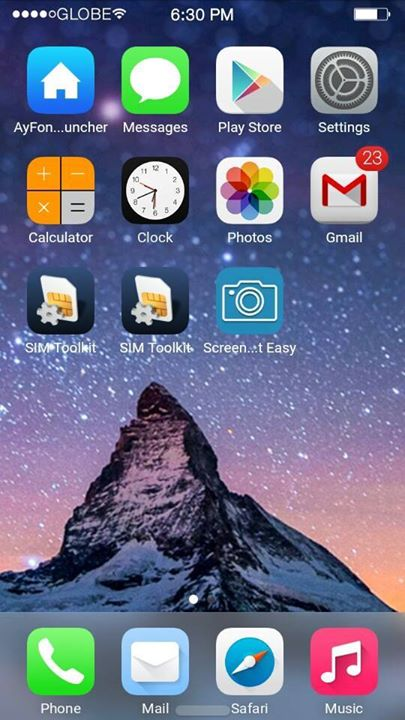
ROM] IOS 8 ROM FIST EVER FOR MT6592 DEVICES OCTACORE


[ROM] IOS 8 ROM
FIST EVER FOR MT6592 DEVICES
OCTACORE


Note: Read everything first before commenting or asking anything, otherwise, I’ll ignore you.If you have any concerns or you discovered new bugs, please kindly comment it here.

** NOTE **
Back up first! I'm not responsible if you brick your device or anything happens to your phone.

                                   
** ROM DETAILS**
- SINGLE SIM ONLY
- 95% Iphone 5 UI and Framework
- Rooted
- Powered by Viper4AndroidFx
- Built in Xposed
- Built in Gravitybox
- Built in Ayfone Gece Modu
- Smooth Interface
- IOS8 Ringtone and Notification sounds
 **KNOW BUGS FIXED **
- SD card can't read (FIXED)
- Camera Flash not working (FIXED)
- Changing Wallpaper FC (FIXED)
- Gravitybox not working (FIXED)
- Internal storage can't read (FIXED)
- Overheating while charging on screen off (FIXED)
THAT’S ALL FIXES I CAN DO (YOU CAN SEARCH FOR OTHER BUG FIXES)

** Known Bugs  **
 - Inaccurate Internal / Storage
 - let me know if there’s any

DOWNLOAD LINKS
SOON
COMMENT BELOW IF U WANT THIS

DOWNLOAD LINK FOR PORTERS
LINK

link 2  with my support

Sunday, 6 August 2017

Aicp 10 5.1.1 Based Rom for lava iris x8 (mt6592)

Aicp 10 5.1.1 Based Rom for lava iris x8 (mt6592)


The Android Open Source Project

Code:
/*
* Your warranty is now void.
*
* I am not responsible for bricked devices, dead SD cards,
* thermonuclear war, or you getting fired because the alarm app failed. Please
* do some research if you have any concerns about features included in this ROM
* before flashing it! YOU are choosing to make these modifications, and if
* you point the finger at me for messing up your device, I will laugh at you.
*/


What is AOSP?
AOSP is Android as Google publish without other modifications. More or less AOSP is the Nexus devices stock rom 


This Rom is ported From Nibru H1 Device


Special thanks to, the CM team,OMNI team ,SLIMROMS and of course to all the supporters


Features
working

Dual sim. 1st Sim is 3G.
Video recording (3rd party)
Bluetooth
Wifi
Audio working
Outgoing call working
SMS working and new sms FC fixed.
Themes working.
Camera working
Full UI working
Video playback
Default storage is sdcard.
Explore more by yourself.
Tested with Google Maps
Google Contacts, Calender Sync WorkingYou can choose : Preferred Install Location
All Games,Apps Supported on Play Store (Unlike Before, on CM12)
Omniswitch
Ad blocker
CM12.1 features
Gesture Anywhere
Show CPU Info
App Circle Bar
CM Theme Engine
Notification FC Disabler
LCD Changer (persistent)
Recents Panel Settings
Network Traffic on statusbar
Boot animation changer
Slim’s Heads Up, with the ability to disable QS Tiles

Add Titanium backup
Gapps
Root by kinguser (do not use superuser or superSU or you will lose your titanium backup!!! )


Not Working/Bugs:

Sim2 Data not working
Hotspot
Fm Radio

Q- When u call someone ur phone is reboot A- When your aicp rom will boot just go to setting select the sim which you want to call dont let always ask else everytime if u you call Someone phone Will reboot


DOWNLOAD LINKS
ROM: LINK

PATCH 1 AUDIO : LINK
PATCH 2 CAMERA : LINK updated LINK updated now
Sim reversal fix : LINK

LOW SOUND FIX
LINK

Tuesday, 23 February 2016

Resurrection Remix ROM 5.5.9 FOR PORTERS (MTK 6592/6582)

 
About Resurrection Remix ROM
Installation
Downloads 
About Resurrection Remix ROM 


Resurrection Remix the ROM has been based on CM,slim.omni and original Remix ROM builds, this creates an awesome combination of performance, customization, power and the most new features, brought directly to your Device
Many things that in previous versions were tweaked with mods, are now included by default in the ROM so, please enjoy!
Special thanks to, the CM team,OMNI team ,SLIMROMS and of course to all the supporters
Included Main Features


-Navigation Bar
-Enable/Disable Navbar
-Navbar Ring Switch
-Navbar Ring Targets
-Navbar Button Customization
-Navbar Dimensions(Potrait & Landscape)

-Statusbar
-Brightness Slider
-Enable/Disable Show Notification Count
-SuperUser Indicator Switch
-Carrier Label
-Carrier Label Switch
-Carrier label Colour
-Quick PullDown Switch
-Smart Pulldown Switch
-Clock Customizations
-Time & date
-Clock Colour
-Day & date Toogle
-Center Clock/Right Clock Choice
-Battery
-Battery Bar customization
-Battery Icon Customization(circle/landscape/Potrait and more)
-Battery % Text
-Network Traffic Indicator

-Theme Chooser
-RR exclusive PITCH BLACK THEME
-Animations
-Toast Animations
-ListView Animations
-System Animations

-Gestures
-Gestures Anywhere Feature

-App Circle Bar
-Choose apps in App circle
-Trigger Width
-Trigger Hieght
-Trigger Position

-Recents Panel
-Clear All button Switch
-Clear All Tasks Switch
-Clear All Button Location(Top right,Top Left,Top Center,Bottom Left,Bottom Right,Bottom Center)

-Cclock Widget
-CLock And Alarm Customizations
-Weather Panel Customizations
-Calender Events

-LockScreen
-Lockscreen Shortcuts
-Choose upto 5 Shortcuts
-100+ Icons for Shortcuts

-Quick Slider Shortcuts

-Notification Drawer
-Weather Display Switch
-Quick Settings
-Choice to Add 20+ Tiles
-Enable 2/3/4 Tiles per Row
-Enable Disable Birghtness Slider in Notification Panel
-Advanced Location Settings Switch(Choose Battery saving/Device Only/High Accuracy Directly in Notification Panel)
-LongPress Toogles to Enter Settings

-Buttons
-Backlight Timer
-Backlight Strength
-Navigation Bar left/Right handed mode Switch
-Power Menu
-Power Menu End Calls Switch

-Home Button(For devices with HW keys Only)
-Home Button Wake Up
-Home Button answer call
-Long Press Actions
-Double Tap Actions

-Back Button(For devices with HW keys Only)
-Wake Up device Switch

-Menu Button(For devices with HW keys Only)
-Wake Up Device Switch
-Short Press Actions
-Long Press Actions

-Search Button(For devices with HW keys Only)
-Wake Up Device
-Short Press Action
-Long Press Action

-Volume Buttons
-Wake Up Device
-Playback Control
-Keyboard Cursor Control
-Swap Buttons on Landscape mode

-Perfomance Profiles
-LCD Density
-Expanded Desktop Mode
-All New CM Audio FX App
-Heads Up Customizations
-OverAll Smoothness Improvements
-Quick Unlock
-Optimizations to Improve Battery
-ALL cm12 Features
-AND MUCH MUCH MORE
DOWNLOAD LINKS
HERE

MY YOUTUBE CHANNEL
YOUTUBE.COM/ANDROIDNOOBS
PLEASE SUB MY CHANNEL FOR MORE

Wednesday, 23 September 2015

[ROM]HYBRID LG G3 -- BASED ON DARK Lfor mt6592 octacore devices

[ROM]HYBRID LG G3 -- BASED ON DARK L for mt6592 octacore devices


Great news to SKK LYNX the porting team ARGN has released a new ROM LG G3 themed AOSP ROM with amazing features

** Bugless ROM*
* LG G3 themed UI*
* Google keyboard*
* More Ram Space*
* Good Battery saver *
* Stable and Smooth*
* Increased Camera Quality*
* Dolby Effects added*
="border-style: initial; border-width: 0px; box-sizing: border-box; margin: 0px; padding: 0px;" width="738px">
* Bloat Wares Removed*
* Fully Deodexed *
* LG G3 ringtones *
* Dark L Features 4G speed H+
* And Much More.......


HOW TO INSTALL?
(Phils/TWRP/CWM)
Go to recovery...
Clean to install new rom
install zip
after installing the zip wipe cache and dalvik/art cache then REBOOT!
and choose no.

--CREDITS--
UNITED OF LYNX PORTING TEAM
TEAM ARGN
DARK L TEAM

[ROM] MIUI v7 5.9.17 Global For MT6592 (Dual 3G)

[ROM] MIUI v7 5.9.17 Global For MT6592 (Dual 3G) FOR PORTERS ONLY 
Disclaimer: I am not Responsible to any or what may happen to your device.
Make Sure you have a full back up of you stock rom (Current rom)
The ROM is fully tested and Currently on running on my device.
MIUI 7 China Developer ROM 5.9.17 Update Highlights
[System]
Cleanup in Recents now supports cleaning app cache
[Music]
New Music App Interface
MIUI 7 China Developer ROM 5.9.17 Full Changelog
[System]
Optimization - Clean up shortcut supports cleaning apps' cache (09-15)
Optimization - Apps locked in recent task page will not be closed by system when remaining RAM is low (09-15)
Optimization - Reduced WiFi power consumption (09-17) (Redmi Note 2)
Fix - In some situations the screen might flicker (09-17) (Redmi Note 2)
Fix - Sometimes switching WiFi caused the system to get stuck (09-17) (Redmi Note 2)
Fix - There were noises when playing some games after turning media volume off (09-17) (Redmi Note 2)
Fix - Sometimes bluetooth car kit could not be connected (09-17) (Redmi Note 2)
[Lockscreen, Status Bar, Notification Bar]
Optimization - Reduced status bar RAM usage (09-15)
Fix - Sometimes, notifications' order changed automatically in Notification shade (09-15)
Fix - Music widget play/pause button had error in some situations (09-15)
Fix - Sometimes status bar disappeared (09-15)
[Home screen]
Optimization - Removed 'Lock SMS' option from Child mode (09-14)
Optimization - Unified third party apps' launching animation (09-14)
Optimization - Enhanced home screen smoothness and speed of opening folders (09-15)
Fix - Black line in right side of screen after formatting device/initilaizing home screen (09-14)
Fix - Display error when using images taken by the device as wallpaper (09-14)
[Gallery]
Optimization - Reduced large image page RAM usage (09-15)
Optimization - Optimized cloud albums large image downloading progress bar style (09-15)
Optimization - System will use default wallpaper when stop using baby album as lockscreen wallpaper (09-15)
Optimization - Support setting avatar and background image for baby album (09-15)
Fix - Sometimes, recommendation text overlapped with current images (09-15)
[Music]
New - Brand new UI with more music resources (09-15)
[Calendar]
Fix - SwiftKey keyboard could not input Chinese in Calendar app (09-15)
[Clock / Calculator]
Optimization - Added vibration when pressing the options at the bottom of clock page (09-16)
Installation:
CWM:
Reboot To Recovery
- Wipe all Data
- Wipe Cache
- Wipe Dalvik Cache
Install Zip
- ROM
- Dap
- KingUser
Reboot ! & Enjoy
PhilZ:
Reboot To Recovery
- Wipe all Data
- Wipe Cache
- Wipe Dalvik Cache
Install Zip
- ROM
- Dap
- KingUser
Reboot ! & Enjoy
How to's:
1. Enabling 3G on SIM 2
1. Open the provided Dual SIM Control App and go to Data Connection tab
2. Press on "Set SIM 2 as 3G" it'll now set your SIM 2 in "WCDMA Preferred" mode. Enjoy 3G on SIM 2. If you want to set as "WCDMA Only" mode, follow step 3, 4 & 5
3. go to settings/about phone and tap 4 or 5 times on Internal Memory, it'll lead you to testing mode
4.From Testing, press Phone information 2
5.You'll see "WCDMA Preferred" press it and change it to "WCDMA Only"
credits 
NAMELESS PORTING TEAM'
FACEBOOK
MIUI

ROM DOWNLOAD 

audio patch LINK

Sunday, 16 August 2015

miui 7 for mt6592 for porters

For porters only miui 7 for mt6592


MIUI 7 Pink Theme
The new ROM packs four new themes focused on gender e.g. Pink “Goddess” theme for Xiaomi’s female users, you can even obtain images of specific people in your gallery through a face recognition tech inside. If you are a pet lover then you will be pleased to know that Xiaomi has even added a pet section which contains all the pet snaps that you have taken.
MIUI 7 Gallery face recognition
MIUI 7 features 1

Here is the key features of MIUI 7:

  • The brand new MUSE feature will allow users to create themes without any programming language.
  • Total four different category framework UIs comes pre-loaded including women, girls, boys and luxury version. Extravagance form, every offering upgraded desktop symbols, individual design elements and more personalized features.
  • Standard MIUI 7 has five sets framework UI that can be changed during the boot time.
  • Quicker user interface response time and transition animations by around 30% contrasted with MIUI 6.
  • Streamlined CPU planning system, strict background power administration to let an application to wake up just when it’s required and breaking point superfluous utilization of WiFi, information system or area administrations out of sight to enhance battery life by 7 to 25% contrasted with MIUI 6
  • New huge textual styles. For example : standard, medium, large and Extra large.
  • Face Unlock innovation naturally recognizes and sorts out photographs of infants and pets as an accumulation that can be shared effortlessly
  • Kids mode shrouds all your own data and desktop formats, with the goal that kids can get to applications just you offer access to.
  • My business card gives you a chance to include your picture that will appear on your friend’s screen when you call or even a five second video feature
  • Mi Roaming is another virtual SIM service that works in 36 locales nations and areas, including China, Hong Kong, China Taiwan, the United States, Japan, UK and Australia. You can appreciate International meandering in these districts and purchase information at a normal cost of only 0.1 yuan for each MB or beginning at 15 yuan for every GB (US$2.3 approx.).

Download LINK