Showing posts with label XDA Forum. Show all posts

Saturday, 2 November 2013

Get Google's Launcher App free without having a Android 4.4 KIT KAT on your Android smart phone or tablet

Two things struck me with Android 4.4 KIT KAT release.  One is its reverse compatibility upto Android 2.3 and the other is the FREE Launcher it will be featuring on it.  Upto most of the Android updates starting from Gingerbread were not compatible with each other due to the resources used by the later versions of Android. However with Android 4.4 KIT KAT, Google has been able to keep a check on the resource usage and which ultimately means that any smart phone or tablet with a 512MB RAM will be able to run the KIT KAT on its system.  This way Google's dream of having a universal OS will come true and all users will now get the top of the line features like Google Now (Personal Digital Assistant) on their smart phone.
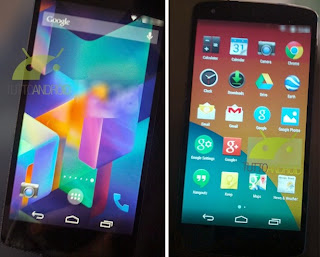
Get Google's Launcher App free without having a Android 4.4 KIT KAT on your Android smart phone or tablet

I will write a full review of Android 4.4 KIT KAT where I will cover the full OS piece by piece and feature by feature.  As of now KIT KAT is only available for Google Nexus 5 manufactured by LG of Korea.  One of the few features that have been successfully ported to other devices is the free LAUNCHER that will come with Android 4.4 KITKAT.  Now you dont have to download third party launchers for your smart phone and be worried about rooting, permissions and access as Google's default Free Launcher is a nice feature to have.

XDA Forums publisher Geoworld_200 has ported this App to his LG Optimus Pro running on Android 4.3.  He has also successfully tested the Launcher on devices running of Android 4.2 and they came out ok.  Some users have successfull run the App on Android 4.1 as well but be warned that you may have to uninstall the App if its unsuccessful.

You can download the APK from here or here and try it out at your own risk.  The instructions for installing the zip file are as follows :
1. Download the zip file from below.
2. Extract the zip and place the apks on your phone
3. Install PrebuiltGmsCore.apk
4. Install Velvet.apk
5. Install GoogleHome.apk
6. Press home button, select the launcher and enjoy!

I am leaving you with a nice video of Android 4.4 Kit Kat released by Android Authority.

Wednesday, 16 October 2013

Send and receive SMSes within the Game or App you are using without having to go to your inbox with Floating Texts for Android smart phones

Many a times it so happens when we are playing a game or using a App and are in middle of something good when we receive a notification about SMS.  Sometimes its the other way around, when you are surfing the web or within a App you come across something which you want to convey to your friends immediately.  Upto now you did have to minimise whatever you were doing to go to the inbox of your Android smart phone to answer or receive your SMSes.  
Send and receive SMSes within the Game or App you are using without having to go to your inbox with Floating Texts for Android smart phones

Not any more a publisher, Manuja Gunaratne has come up with a gem of App which not only lets you view the messages within what ever you are doing but also answer to them :) if they are important. The App is called rather justly 'Floating Texts' and every Android user might need to download this one.
Send and receive SMSes within the Game or App you are using without having to go to your inbox with Floating Texts for Android smart phones

Floating Texts workis on a simple premise of sending and receiving your text messages without having to stop what you are doing. You can continue your work and Floating Texts will display a popup with text messages on top of your applications so you can multi-task. If you choose to reply, you can reply within the popup and get back to your work!   The App features are quite brilliant.  For one the text messages will appear on the top of all the Apps you have on your Android smart phone or tablet.  Another example of the brilliance of the App is that if you wouldnt like the popup to interfere with whatever you are doing you can turn the feature off till you complete your task.    

The texts so received can be answered instantly or you can ignore them if they are spam or adverts.  You can also swipe through multiple text messages to go to the most relevant one.  Other features include
- Real-time updating texts
- Display text message after unlocking
- Turn on/off SMS popup
- Customize the popup duration
- Customize the popup colour

You should download this must have App for free for your Android smart phone and tablets. I wouldnt have cribbed if the publisher had made this wonderful App a paid one. You can visit Google Play here and download it or download the APK from here.